Conference lead capture without a booth
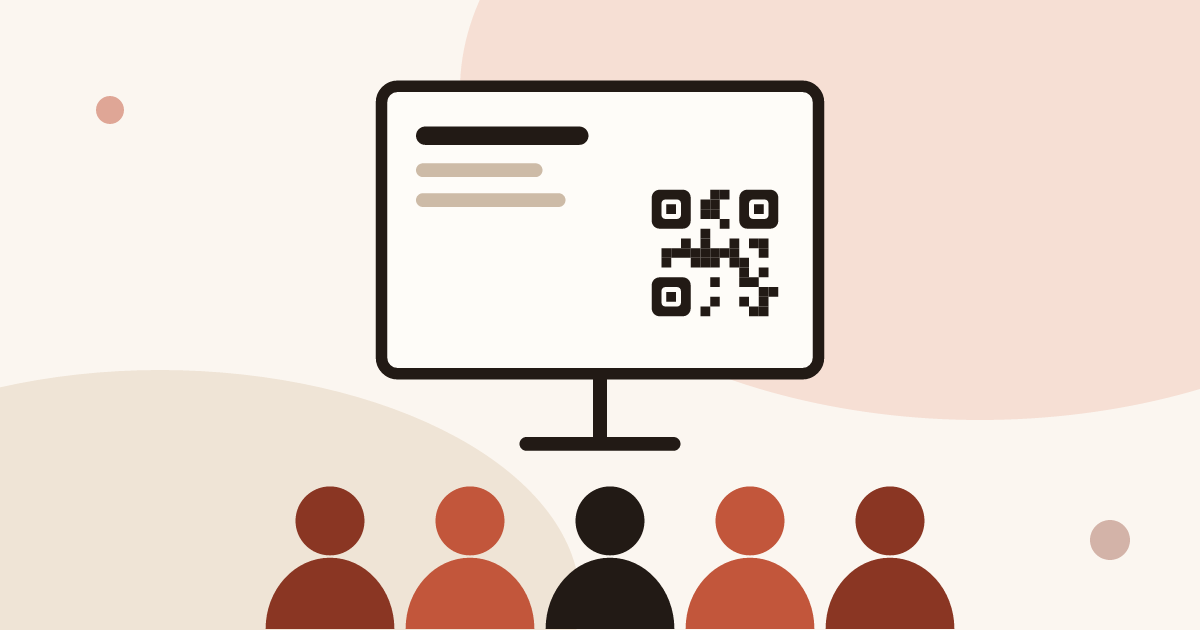
To capture leads at a conference without a booth, put a QR code that opens your digital card where people are already looking: the last slide, a table, a networking break. They open it in their browser, save your contact and leave their details. Your role (speaker, attendee, sponsor) decides which method fits.
For the full picture, read the complete guide: trade show lead generation.
Trade show or conference: differences in lead capture
At a trade show you have a booth, visitors who walk up to you and time to talk. At a conference you have none of that. People sit, listen, then mingle for thirty minutes at the break. Three differences matter for lead capture.
- No fixed spot. Nobody comes to find you, so you have to be reachable during the session, not after it.
- Short exchanges. A break-time conversation lasts a few minutes. Sharing has to take a few seconds.
- Little equipment. No badge scanner for you, no table, and often poor signal in the room.
So anything that needs a booth or hardware drops out. All that remains is a phone and a QR code. For the booth case, see our article on how to collect leads at trade shows.
Speakers: a QR code on the last slide
You are talking to forty or two hundred people. This is the best moment to capture contacts, because your audience has just spent twenty minutes listening to you. The only risk is letting them leave with no way to reach you.
Put a QR code on your last slide that opens your digital card, with one sentence stating the benefit for people: the slides, a checklist, a meeting. Keep the slide up during questions. A QR code that disappears after five seconds is useless.
On the card side, three settings help:
- A visible link such as "Get the slides" or "Book a call".
- A short form: name, email and one qualification question. Every extra field loses people.
- A consent line, because you are collecting personal data.
The qualification form is part of the Pro plan, which has a 14-day trial. Without the form, the card on the free plan is still useful: people save your contact to their phone and you can find them through the link.
Attendees: networking with your digital card
You are in the room to meet people. Exchanges happen at the break, in the coffee queue, after a session. Handing over a paper card works, but you need to have brought enough and you have to retype everything later. With a digital card, sharing takes one gesture.
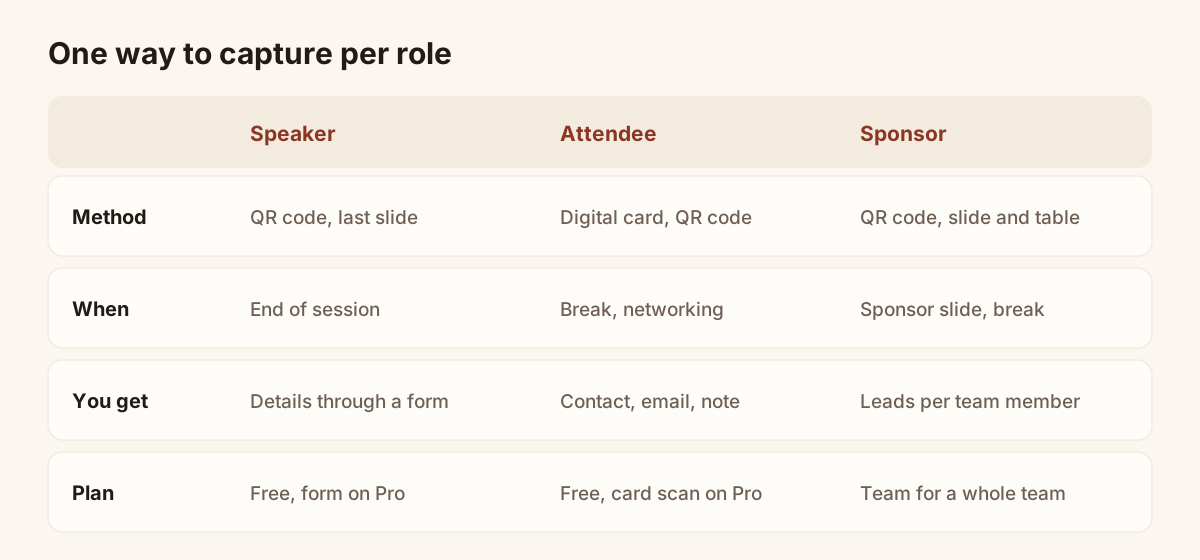
One way to capture per role, and the data each one brings back.
Open your card and show the QR code. The other person scans it with their phone camera, sees your name, job title and links, and saves your contact in one tap, with no app to install. With the form, they can also leave their email. You share in seconds, without digging through your bag.
For paper cards that people hand you, the Lead Scanner reads the photo and fills in the record. You check it, add a note and save. The details are on the business card scanner page.
A tip from the floor: write down the context straight away. A ten-second voice note in the corridor ("talked about Q1 budget, wants a demo") is worth more than thirty records with no comment. The note is recorded, not transcribed, so you listen to it later.
Sponsors: capturing without a booth
A sponsor without a booth has a logo on a screen and sometimes five minutes on stage. Leads come from the materials you make visible: the sponsor slide, a table, a banner.
- On the sponsor slide: a QR code to a page or card that offers something specific, such as a guide or a demo slot.
- On a table or stand-up sign: the same QR code, large enough to scan from a metre away.
- On your team’s cards: each person present carries their digital card. Contacts come back to the rep who shared their card.
The Team plan lets you assign leads to members and keep one brand across all cards. It helps when five people from your company are in the room. See the trade show lead capture page for how it works for a team.
One limit to know: Piktechs does not read organiser badges. If the organiser offers sponsors a scanner, you can take it as well. Piktechs then qualifies the people you had a serious conversation with.
Follow-up after the event
Follow-up decides the value of the event. Conferences come one after another, and the person you met on Tuesday has forgotten your name by Friday.
- The same evening: sort your contacts. Set a high, medium or low priority and add a tag with the conference name.
- Within two days: send a short message that recalls the context ("we talked about the Lyon pilot"). The note makes that possible.
- Set a follow-up reminder on priority contacts, with a date and a reason.
- Sync the leads to HubSpot or Odoo, or to another tool through Zapier and Make. A CSV export is always available.
For large events, also read the article on lead retrieval: it details the data organisers provide and the data they do not capture.
Prepare your conference in ten minutes
Before you leave, check four things. Open your card on a phone that is not yours and save the contact. Test the slide’s QR code from a distance, projected or printed, the way the back row will. Reread the form: three fields at most. Finally, decide who follows up with whom, and when, so the follow-up does not depend on how you remember the week after.
Frequently asked questions
Do you need a booth to capture leads at a conference?
No. A QR code on your last slide, a digital card to show at the break and a scan of the paper cards people give you are enough. A booth only changes volume and conversation time.
What should a speaker put on the last slide?
A QR code large enough to scan, one sentence stating the benefit of scanning, and nothing else. Keep the slide up during questions so everyone has time to scan.
Do attendees need to install an app?
No. They open your card in their phone’s browser and save the contact in one tap. You use Piktechs in your own phone’s browser.
Does it work without signal in the room?
Leads captured without signal are kept on your device and sent when the connection returns. The other person does need a connection to open your card, so have a fallback, such as a link to send them later.
What about GDPR for these contacts?
You collect personal data, so consent has to be clear. Piktechs records GDPR consent with each lead and hosts data in the EU. The wording of the consent text remains your responsibility.
Read next
 Guide
Trade show lead generation: the complete guide
Trade show lead generation, step by step: prepare the stand, capture leads, qualify on the spot, handle consent, sync to your CRM, follow up in 48 hours.
 Article
Trade show badge scanner: rent it or do without?
How a trade show badge scanner works, the visitor data it leaves out, and a checklist to decide whether to rent it, complete it or skip it.
 Article
Lead Capture Software: A Buyer’s Guide by Criteria
Choose lead capture software: five families of tools compared, ten criteria as a checklist, and a trial on one event. No brands, only points to test.
 Article
Trade show checklist: how to prepare, step by step
A trade show checklist by period: three months out, one month, the week before, each show day and after. Goals, team, lead capture and follow-up.
 Article
Trade show follow up email: method and 5 templates
Trade show follow up email method: when to write, how to sort leads, five templates, a short phone script and a three-week follow-up sequence.
 Article
Digital Business Cards for Trade Shows: Capture Every Lead at Your Stand
Use digital business cards and a stand QR code to capture, qualify and sync trade show leads to your CRM, with no badge reader to rent.
Create your digital card
The Free plan includes one live card. No app needed for the people who receive it.