How to qualify sales leads: method, criteria and examples

To qualify sales leads, check right after the first contact that the person has a real need, a budget, the power to decide and a timeline. A qualified lead deserves a quick call. The others wait or enter a slower follow-up. This guide gives the method, the questions and the tools to do it in the field.
How to qualify sales leads: definition of a qualified lead
A lead is a person or a company that left their details or that you met. A qualified lead is a lead whose interest and fit with your offer you have checked, using a few criteria fixed in advance. Qualification turns a list of names into an ordered list of people to call.
Why qualify
Without qualification, every contact looks the same. After a day of meetings or a trade show, a rep holds dozens of records and has no way to know which one to open first. Qualifying does three jobs:
- it picks tomorrow’s calls on evidence;
- it stops you chasing first a person with no budget and no project;
- it hands the CRM and your colleagues a record that reads well without having been at the conversation.
Qualifying is not selling
Qualification comes before the commercial proposal. It asks short questions and does not try to convince. A three-minute talk at a stand is enough to collect four useful answers, as long as you know which ones to ask.
Qualified for whom
There is no universal definition. A qualified lead for a team selling a subscription to small businesses does not look like one for a team selling equipment to industrial groups. The definition is set with sales: it lists the criteria and the answers that trigger a call. Write it down, share it, and keep the same one for the whole team.
Lead, MQL, SQL: the vocabulary of lead qualification
Three acronyms come up in every talk between marketing and sales. They describe stages of maturity of a contact.
| Term | Meaning | Who decides | Example event |
|---|---|---|---|
| Lead | Identified contact, nothing verified | No one | A person leaves their details at a stand |
| MQL (Marketing Qualified Lead) | Lead that marketing judges promising from its actions or profile | Marketing | A visitor downloads a document and matches the target |
| SQL (Sales Qualified Lead) | Lead that sales judge ready for a commercial conversation | Sales | A rep confirms a need, a decision maker and a timeline |
From MQL to SQL
The move from MQL to SQL is a sales decision, taken after a conversation. In a fully online journey, the move follows a scoring rule. In a field journey, it usually follows a face-to-face talk: the rep has just spoken with the person, knows the answers to the key questions and can classify the lead directly.
Where field qualification fits
A contact met at a trade show or in a meeting is already a lead, and sometimes an SQL after ten minutes of talk. Field qualification skips the detour: instead of waiting for marketing to score the contact from clicks, the rep records the criteria during or just after the exchange.
The acronyms are optional. A team of three can do with two states: “call first” and “follow up later”. The point is that every lead carries a state and that everyone reads the same state the same way.
Lead qualification criteria for B2B
Lead qualification criteria are the questions a lead has to answer to move up the list. Four criteria cover most B2B sales.
Need
The need describes the problem the person wants to solve and its link to your offer. A specific need (“we are replacing spreadsheets across 40 shops”) weighs more than curiosity (“I was looking at the market”). Ask how the solution will be used, who will use it and which tool is in place today.
Budget
Budget tells you whether the spend is planned or possible. Ask with tact and record it without an exact figure: planned, to confirm, unknown. In a trade show exchange, yes, no or unknown is enough. The amount is for the next meeting.
Decision maker
Does the person across from you sign, recommend, or pass the request on? A decision maker closes a deal. An influencer moves it forward. A contact with no power usually asks for a presentation to their manager. All three cases are worth recording, with the name of the decision maker when known.
Timeline
The timeline places the project in time: under three months, three to six months, later. A near timeline gives call priority. A distant one calls for slower follow-up, not for dropping the lead.
Choosing your criteria
Four criteria are enough to start. Add a fifth only if it changes the decision to call: company size, sector, region, current solution. Each added criterion lengthens the conversation at the stand and slows data entry. Keep the ones whose answer you really use.
The BANT method, with a grid of questions
BANT is a qualification acronym born in B2B sales. It groups four criteria: Budget, Authority, Need and Timeline. The method comes from the era of complex sales and is still used because it fits in four questions.
The BANT question grid
| Criterion | Question to ask | Answer that raises priority | Answer that lowers it |
|---|---|---|---|
| Budget | “Is a budget planned for this project?” | Yes, or to confirm with a figure | No, or no funded project |
| Authority | “Who decides, and who else is involved?” | The person decides or knows the decision maker | No link to the decision |
| Need | “Which problem do you want to solve with us?” | A specific problem tied to your offer | Curiosity with no project |
| Timeline | “When do you want a solution in place?” | Under three months | Later, with no date |
Limits of the method
BANT suits purchases where a budget and a decision maker exist from the first exchange. In a longer sale, where the budget is built during the discussion, an “unknown” on budget should not rule the lead out. Record the unknown, follow up, and keep the need as the main criterion. These grids help you decide. They do not give a verdict.
Adapting BANT to your team
Reword each question in your customers’ words. In a team selling to shops, “Budget” becomes “Is a budget set aside for this year?”. In a team selling to large accounts, “Authority” becomes “Who signs off on a purchase like this at your company?”. A natural question gets an honest answer.
The steps of lead qualification
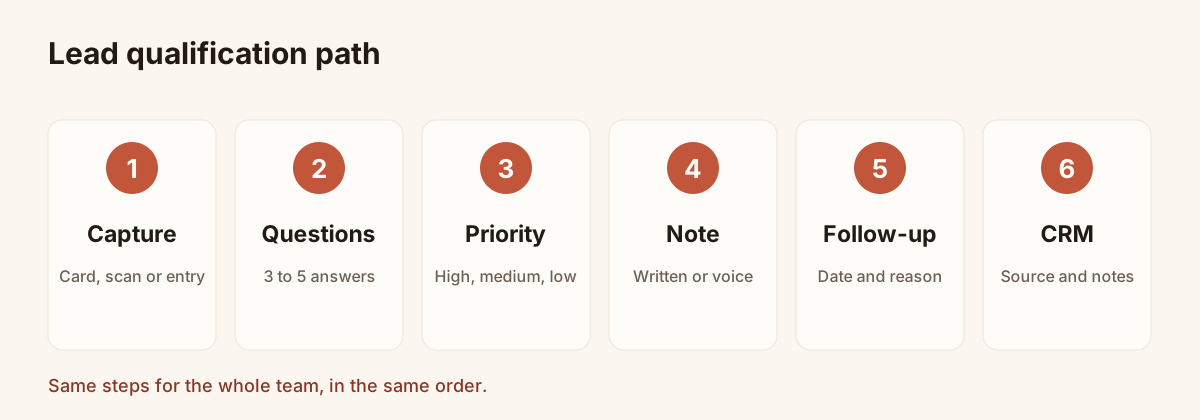
Qualification follows the same sequence whatever the channel. Each step is set up in the capture tool.
- Capture the contact. A shared digital card, a photo of a paper card or a manual entry creates the record, with its source and date.
- Ask the key questions. Three to five questions, the same for the whole team, with answers to pick rather than write.
- Set a priority. High, medium or low, based on the answers and your grid.
- Add context. A written or voice note that keeps the detail the grid cannot hold: a name, an objection, a promise.
- Schedule the follow-up. A date and a reason, so the lead is not left without a next step.
- Hand over to the CRM. The record leaves with its source, answers and notes for the tool that stays the system of record.
Roles in the process
In a small team, the rep who meets the person runs steps one to five. In a larger team, one person may assign leads to reps after capture. The common point is the rule: every lead goes through the same steps, in the same order.
How long to spend
Qualifying a lead should take a few minutes. If it outlasts the conversation, reps will skip it. Aim for answers picked in one gesture, a priority and a short note. Details are completed at the next meeting.
Qualifying in the field and at trade shows: questions, priority and note
The field imposes constraints the office never meets: you are standing, it is noisy, the next person is waiting, and the network is sometimes missing. The method has to hold under those conditions. For a full trade show preparation, read the guide to trade show lead generation.
Three to five questions, no more
Choose three to five questions and fix them before the event. A good starting set follows BANT: budget, decision maker, timeline, plus one question on interest (which offer or feature). In Piktechs, you define these questions once in a qualification form, then switch it on for the team’s cards. Forms are part of Pro and Team.
There are two ways to collect the answers:
- the person fills them in from your card, after scanning the QR code or tapping the phone;
- the rep records them on the contact, one tap per answer, right after the exchange.
Either way, the answers are saved on the contact with the date and the source. See the article on how to collect leads at trade shows for the flow of a day on the stand.
A priority in one gesture
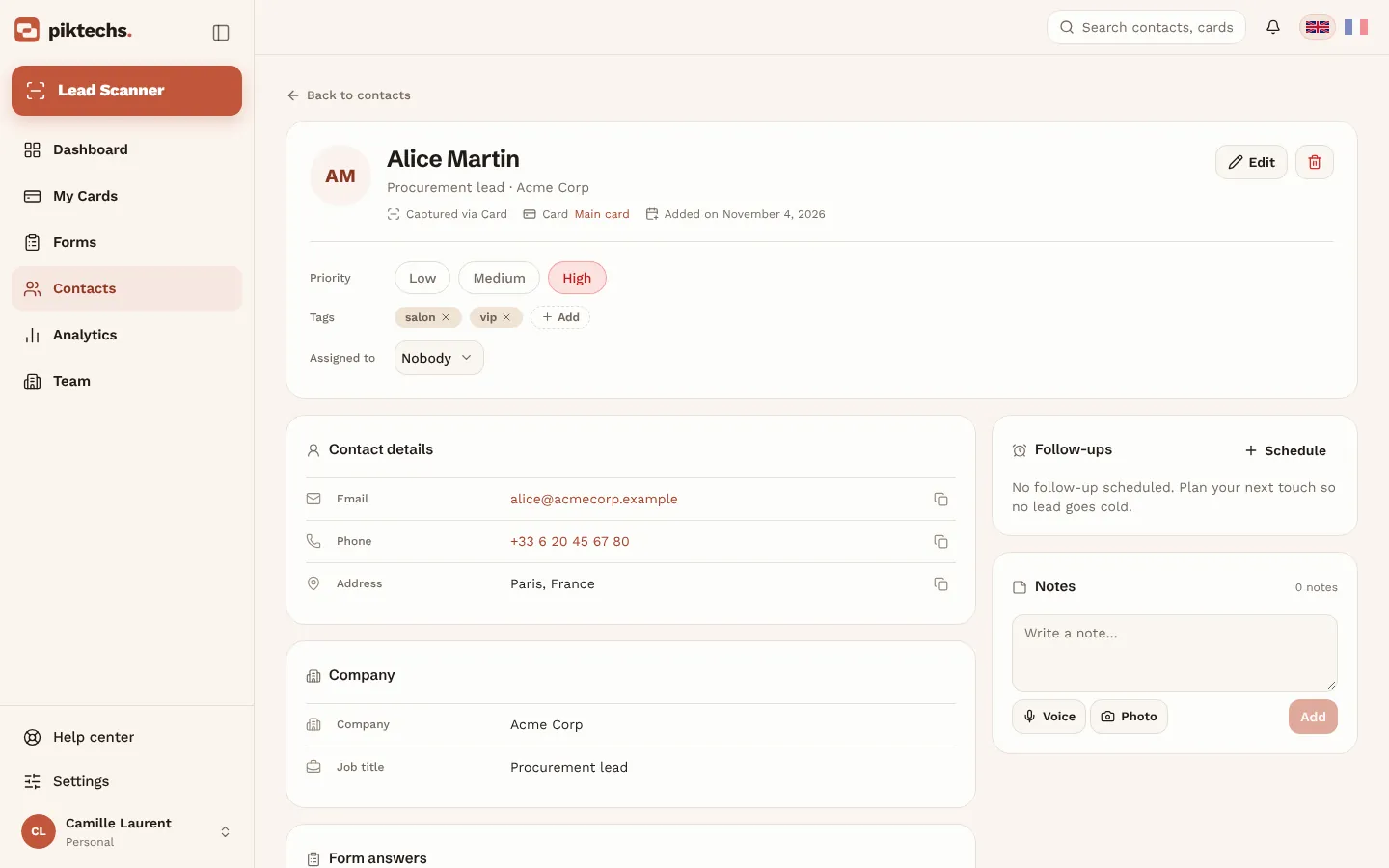
After the questions, set the priority: high, medium or low. It answers a single question: who do I call first tomorrow morning? The contact list then filters by priority, which gives the calling order directly.
A note that keeps the context
The grid does not hold everything. A written note keeps the sentence that matters: “wants a pilot in Lyon first”, “waiting for the January budget”. Piktechs also records a voice note of up to two minutes, stored on the record and playable again. Voice notes are recorded, not transcribed: they are audio files, not text. If a detail has to appear in a spreadsheet or a CRM, write it down too.
Tags to find your leads
Add a tag with the name of the show or campaign when you qualify. It lets you find the leads of one event and export them together. To choose a capture app that suits your team, read the article on choosing an event lead capture app.
When there is no network
Leads left on your card are queued on the visitor’s phone and sent when the network returns. Leads captured by the team without signal are kept on the device and synced afterwards. Qualification carries on in a hall with no signal.
Piktechs screen, sample data.
Qualifying in a customer meeting
A visit to a customer or a shop follows the same logic, with more time. Field reps who share their digital card keep the same grid of questions. For the use of the card by travelling reps, read the article on the digital business card for field sales.
Simple lead scoring: a points method
Lead scoring gives points to each answer and adds up the total. The total gives the priority. The method removes mood from the ranking and makes decisions comparable from one rep to another.
Building a grid
- List your criteria (for example need, budget, decision maker, timeline).
- Give each answer a number of points, higher for answers closer to a purchase.
- Weigh more heavily the criteria that most often decide a sale in your business.
- Set two thresholds that separate high, medium and low priority.
- Review the grid after a month against actual sales: a criterion that changes nothing is removed.
A constructed example
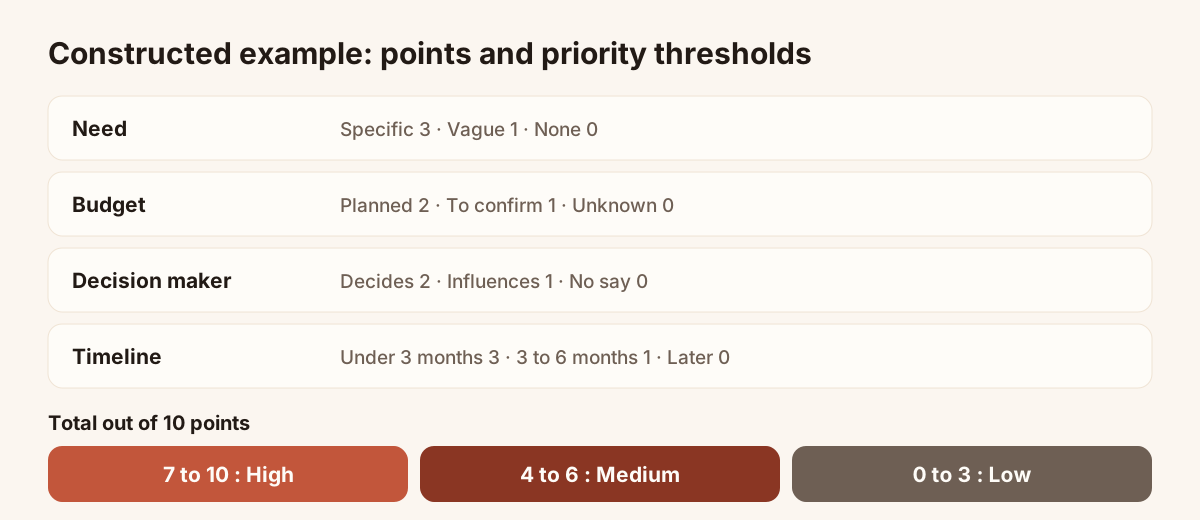
The example below is constructed to illustrate the method. It rests on no real data or statistic: set the points according to your own sales.
| Criterion | Answer | Points |
|---|---|---|
| Need | Specific, tied to the offer | 3 |
| Need | Vague | 1 |
| Need | None | 0 |
| Budget | Planned | 2 |
| Budget | To confirm | 1 |
| Budget | Unknown or no | 0 |
| Decision maker | Decides | 2 |
| Decision maker | Influences | 1 |
| Decision maker | No say | 0 |
| Timeline | Under three months | 3 |
| Timeline | Three to six months | 1 |
| Timeline | Later | 0 |
The maximum is ten points. Thresholds in the example: 7 to 10, high priority; 4 to 6, medium priority; 0 to 3, low priority. A lead with a specific need (3), a budget to confirm (1), a decision maker (2) and a timeline under three months (3) totals 9: high priority.
Keeping human judgement
The score is an aid. A lead on 5 points whose rep heard a real urgency can move to high priority, as long as the reason is noted. Piktechs sets the priority by hand, with no automatic calculation: the rep applies the grid, then decides. That stops a score from hiding context that only the conversation revealed.
Scoring pitfalls
- Too many criteria: beyond five or six, the grid slows data entry and nobody keeps it up to date.
- Points with no link to the sale: a criterion that changes no decision has no place.
- A frozen grid: review it when the offer or the target changes.
Handing the lead to the CRM with its context
A qualified lead loses its value if it stays in a phone. The handover to the CRM follows a simple rule: the record arrives with its source, answers and notes. Piktechs is not a CRM and does not replace one. It captures and qualifies in the field, then feeds the tool that stays the system of record.
Sync routes
| Route | Data received | Point of attention |
|---|---|---|
| HubSpot (native) | Name, email, phone, company, job title, message if mapped | Private app token pasted in the settings |
| Odoo (native) | Same fields as HubSpot | Field mapping to set |
| Zapier or Make (webhook) | Full lead: source, tags, notes, form answers | Suits other CRMs |
| CSV export | List of contacts | No phone, priority, tags or notes column |
Piktechs has no native Salesforce connector: the link goes through Zapier or Make. For the wider picture of a field tool that feeds the CRM, read the mobile CRM guide, and the mobile CRM page of Piktechs presents the qualification features.
Contents of the handed-over record
For a colleague to call without having been at the exchange, the record should carry:
- the person’s identity and company;
- the source (card, scan, manual entry) and the date;
- the answers to the qualification questions;
- the priority;
- a note that sums up the context;
- the owner of the lead, when the team assigns one.
Assigning the lead
On the Team plan, each lead is assigned to a member or a group, and roles decide who sees which leads. A manager can split a show’s leads between reps by region or sector. Without assignment, the lead stays with the person who captured it.
Without a CRM
With no CRM in place, the Contacts screen and the CSV export are enough to work. Keep in mind that the CSV does not carry all the qualification data: a tracking spreadsheet has to be completed by hand, or replaced as soon as possible by a connected CRM.
Follow-up: turning qualification into a meeting
Qualification decides who to call back, and follow-up is the action that comes next. A qualified lead with no scheduled follow-up goes cold.
A date and a reason
Schedule the follow-up when you qualify, not the next day. Each follow-up carries a date and a reason: “call back after the show”, “send the demo recording”, “confirm the meeting date”. In Piktechs, the day’s follow-up reminders show on the dashboard, and one tap is enough to call or write.
Pace by priority
| Priority | Suggested follow-up | Message content |
|---|---|---|
| High | In the days after the exchange | A call or message proposing a meeting |
| Medium | In the weeks after | A message with a useful resource |
| Low | More spaced out | An informative message, no pressure |
These paces are landmarks: set them with your sales team and your customers’ buying cycle. Follow-up after a show is covered in the guide to trade show lead generation.
Measuring without inventing figures
To know whether qualification works, count in your own tool: leads captured, high-priority leads, meetings booked, opportunities opened. Compare one show with the next using the same definitions. No reference rate replaces your own data.
Common lead qualification mistakes
Qualifying too late
A qualification done in the evening, from memory, loses nuance. Do it on the spot or just after the exchange, while the conversation is fresh.
Asking too many questions
Ten questions tire the person and the rep. Keep three to five questions and ask the rest at the meeting.
Not recording the unknown
“Budget unknown” is a useful answer. An empty field does not say whether the question was asked. Always record unknown rather than leaving it blank.
Dropping a lead on a single criterion
An undefined budget does not make a specific need useless. Read all the answers before putting a lead in low priority.
Losing context on the way to the CRM
An export that keeps only name and email wipes out the qualification. Check which data leaves, and by which route, before the first show.
Never reviewing the grid
A grid that was right at the start goes wrong when the offer changes. Review it regularly with sales.
Frequently asked questions
What is a qualified lead?
A qualified lead is a contact whose interest and fit with your offer have been checked against criteria fixed in advance, most often need, budget, decision maker and timeline. It deserves a quick call. The exact definition is set with the sales team.
What is the difference between an MQL and an SQL?
An MQL is a lead that marketing judges promising from its profile or actions. An SQL is a lead that sales judge ready for a commercial conversation after checking its needs. The move from one to the other is a sales decision.
What does BANT stand for?
BANT stands for Budget, Authority, Need, Timeline: budget, decision power, need and timeline. It is a grid of four questions to qualify a B2B lead. Use it as a base, then adapt it to your sale and your customers.
How many questions should you ask at a trade show?
Three to five questions are enough. They should fit within a conversation at a stand, with answers to pick rather than write. Details are picked up at the meeting that follows.
Does Piktechs replace my CRM to qualify leads?
No. Piktechs captures and qualifies in the field: questions, priority, tags, notes, voice notes and follow-up reminders. It then feeds your CRM, natively for HubSpot and Odoo, through Zapier or Make for other tools. Qualification forms are part of Pro and Team, with a 14-day trial.
Scan your first card today
Pro includes Lead Scanner, forms and Contacts. 14-day trial.